Buy discounter-online.com ?
We are moving the project
discounter-online.com .
Are you interested in purchasing the domain
discounter-online.com ?
domain@kv-gmbh.de · 0541-91531010
Buy discounter-online.com ?
Should one use a fan splitter or not?
Using a fan splitter can be a convenient way to connect multiple fans to a single fan header on a motherboard. However, it is important to consider the power draw of the fans and the capacity of the fan header. If the combined power draw of the fans exceeds the capacity of the fan header, it can cause issues such as overheating or damage to the motherboard. Therefore, it is important to carefully assess the power requirements and limitations before using a fan splitter. If the power draw is within the limits, a fan splitter can be a practical solution for connecting multiple fans. **
Can you please describe the notebook CPU fan splitter?
The notebook CPU fan splitter is a small device that allows you to connect multiple fans to a single fan header on your laptop's motherboard. It typically has a female connector that plugs into the fan header and multiple male connectors for the fans. This allows you to effectively control and power multiple fans from a single fan header, which can be useful for increasing cooling capacity and managing system temperatures. The splitter is usually compact and easy to install, making it a convenient solution for users looking to expand their laptop's cooling capabilities. **


Similar search terms for Fan splitter
Top-Angebote
Products related to Fan splitter:


-
How can I build a 4-pin PWM fan splitter myself?
To build a 4-pin PWM fan splitter yourself, you will need a 4-pin PWM fan header, four female 4-pin PWM fan connectors, and some basic soldering skills. Start by cutting the fan header cable to the desired length, then strip the wires and solder each wire to a female fan connector. Make sure to match the correct wires (usually color-coded) from the header to the connectors. Once all connections are secure, insulate the soldered joints with heat shrink tubing or electrical tape to prevent short circuits. Test the splitter with your fans to ensure it is working correctly before using it in your system. **
-
Where can I find a good 4-pin PWM fan splitter?
You can find a good 4-pin PWM fan splitter at electronics stores such as Best Buy, Fry's Electronics, or Micro Center. Additionally, online retailers like Amazon, Newegg, and eBay also offer a wide selection of 4-pin PWM fan splitters from various brands. Make sure to read customer reviews and check the specifications to ensure it meets your needs before making a purchase. **
-
How can the water cooler fan be connected to a PWM splitter?
To connect the water cooler fan to a PWM splitter, you will need to locate the PWM header on the splitter and the corresponding connector on the fan. The PWM header on the splitter will have four pins, while the fan connector will also have four pins. Align the pins on the fan connector with the pins on the PWM header and gently push them together until they are securely connected. Make sure to double-check the orientation of the pins to avoid damaging the components. Once connected, the water cooler fan will be able to receive PWM signals from the splitter for speed control. **
-
Can specific fans be controlled on the motherboard with a fan splitter?
Yes, specific fans can be controlled on the motherboard with a fan splitter. A fan splitter allows multiple fans to be connected to a single fan header on the motherboard, and some fan splitters also allow for individual control of each fan's speed and power. This allows for more precise control over the cooling system and can help optimize the performance of the fans based on the system's needs. However, it's important to check the specifications of the fan splitter and the motherboard to ensure compatibility and proper functionality. **

'Splitter or switch?'
When deciding between a splitter or a switch, it's important to consider your specific needs. A splitter divides a single input signal into multiple outputs, while a switch allows you to choose between multiple input signals to send to a single output. If you need to connect multiple devices to a single source, a splitter would be the better option. On the other hand, if you need to switch between different input sources going to a single output device, then a switch would be more suitable. Ultimately, the choice between a splitter and a switch depends on your specific setup and requirements. **
Splitter or switch?
When deciding between a splitter or a switch, it depends on your specific needs. A splitter is used to divide a single input signal into multiple output signals, while a switch is used to select between multiple input signals to send to a single output. If you need to send one signal to multiple devices, a splitter would be the best choice. However, if you need to switch between multiple input sources to send to one device, then a switch would be more suitable. **
Top-Angebote
Products related to Fan splitter:
-
Drop Dash Deals Side Skirt Extensions Splitter Side Skirt Extensions SplitterTransform your Corvette with these 2pcs side skirt extensions, designed to give your car a sleek, sporty look. Perfectly compatible with 20142019 Corvette models, these gloss black extensions are made from durable plastic, ensuring longlasting...199,97 $*Shipping: 0,00 $Secure redirect to the provider
-
Should one use a fan splitter or not?
Using a fan splitter can be a convenient way to connect multiple fans to a single fan header on a motherboard. However, it is important to consider the power draw of the fans and the capacity of the fan header. If the combined power draw of the fans exceeds the capacity of the fan header, it can cause issues such as overheating or damage to the motherboard. Therefore, it is important to carefully assess the power requirements and limitations before using a fan splitter. If the power draw is within the limits, a fan splitter can be a practical solution for connecting multiple fans. **
-
Can you please describe the notebook CPU fan splitter?
The notebook CPU fan splitter is a small device that allows you to connect multiple fans to a single fan header on your laptop's motherboard. It typically has a female connector that plugs into the fan header and multiple male connectors for the fans. This allows you to effectively control and power multiple fans from a single fan header, which can be useful for increasing cooling capacity and managing system temperatures. The splitter is usually compact and easy to install, making it a convenient solution for users looking to expand their laptop's cooling capabilities. **
-
How can I build a 4-pin PWM fan splitter myself?
To build a 4-pin PWM fan splitter yourself, you will need a 4-pin PWM fan header, four female 4-pin PWM fan connectors, and some basic soldering skills. Start by cutting the fan header cable to the desired length, then strip the wires and solder each wire to a female fan connector. Make sure to match the correct wires (usually color-coded) from the header to the connectors. Once all connections are secure, insulate the soldered joints with heat shrink tubing or electrical tape to prevent short circuits. Test the splitter with your fans to ensure it is working correctly before using it in your system. **
-
Where can I find a good 4-pin PWM fan splitter?
You can find a good 4-pin PWM fan splitter at electronics stores such as Best Buy, Fry's Electronics, or Micro Center. Additionally, online retailers like Amazon, Newegg, and eBay also offer a wide selection of 4-pin PWM fan splitters from various brands. Make sure to read customer reviews and check the specifications to ensure it meets your needs before making a purchase. **
Similar search terms for Fan splitter
-
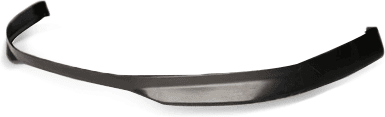
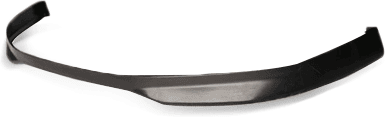
DIEDERICHS 1216663 Front splitterFitting Position: Front, Left, Right; Version: Sport-Technik; Colour: black, Glossy; Quantity Unit: Kit; for facelift: ; Material: ABS (Acrylonitrile-Butadiene-Styrene Copolymerisate); Construction Year from: 09/2008100,99 £*Shipping: 8,45 £Secure redirect to the provider
-
How can the water cooler fan be connected to a PWM splitter?
To connect the water cooler fan to a PWM splitter, you will need to locate the PWM header on the splitter and the corresponding connector on the fan. The PWM header on the splitter will have four pins, while the fan connector will also have four pins. Align the pins on the fan connector with the pins on the PWM header and gently push them together until they are securely connected. Make sure to double-check the orientation of the pins to avoid damaging the components. Once connected, the water cooler fan will be able to receive PWM signals from the splitter for speed control. **
-
Can specific fans be controlled on the motherboard with a fan splitter?
Yes, specific fans can be controlled on the motherboard with a fan splitter. A fan splitter allows multiple fans to be connected to a single fan header on the motherboard, and some fan splitters also allow for individual control of each fan's speed and power. This allows for more precise control over the cooling system and can help optimize the performance of the fans based on the system's needs. However, it's important to check the specifications of the fan splitter and the motherboard to ensure compatibility and proper functionality. **
-
'Splitter or switch?'
When deciding between a splitter or a switch, it's important to consider your specific needs. A splitter divides a single input signal into multiple outputs, while a switch allows you to choose between multiple input signals to send to a single output. If you need to connect multiple devices to a single source, a splitter would be the better option. On the other hand, if you need to switch between different input sources going to a single output device, then a switch would be more suitable. Ultimately, the choice between a splitter and a switch depends on your specific setup and requirements. **
-
Splitter or switch?
When deciding between a splitter or a switch, it depends on your specific needs. A splitter is used to divide a single input signal into multiple output signals, while a switch is used to select between multiple input signals to send to a single output. If you need to send one signal to multiple devices, a splitter would be the best choice. However, if you need to switch between multiple input sources to send to one device, then a switch would be more suitable. **
* All prices are inclusive of VAT and, if applicable, plus shipping costs. The offer information is based on the details provided by the respective shop and is updated through automated processes. Real-time updates do not occur, so deviations can occur in individual cases. ** Note: Parts of this content were created by AI.